Review-OCZ Synapse Cache (Part2): Turn your HDD into an SSD!


Have you read our stand-alone performance review of the OCZ Synapse SSD? Despite its intended purpose as “caching drive”, this SSD performs almost as well as OCZ’s other offerings. In this second article, we will discuss how much performance improvement one can expect by pairing an ordinary hard drive with the Synapse.
As mentioned in the previous article, the OCZ Synapse comes with a serial number for a dowloadable Dataplex software. This software will turn the Synapse into a cache drive for your hard drive (HDD), without joining the two in RAID configuration. What this means is that you do not need to re-install your OS and applications (necessary for installing RAID). The Synapse can be added directly to a running system without any hardware modification, but the serial number for the software is only valid for one computer. When you want to switch system, you need to uninstall the Dataplex first (internet connection required).
OCZ Synapse supports hard drives with a maximum capacity of 2 TB. The Dataplex software itself can be used in just one hard drive. Therefore, for maximum benefit, we recommend you to pair the Synapse with a 2 TB hard drive serving as your boot drive. Aside from that, it only works in Windows 7.
So, how much performance increase one can expect from adding the Synapse to an existing hard drive? To answer that question, we used a Western Digital Caviar Black 500 GB hard drive which is roughly similar to its larger-capacity sibling, the Caviar Green 2 TB, in terms of performance. Before moving on to the results, let’s examine our test bed configuration first.
Test Platform
- Motherboard: Intel H67 LGA 1155
- Processor: Intel Core i7 2600 3,4 GHz
- RAM: Kingston DDR3 8 GB
- Storage: Kingston SSD V+100 64 GB
- Graphics Card: AMD Radeon HD 5550
- Power Supply: CoolerMaster GX 550 Watt
- Input Device: Genius Keyboard and Mouse
- Monitor: 18,5 inch LCD
- Operating System: Microsoft Windows 7 64 bit
Test Results
Crystal Disk Mark
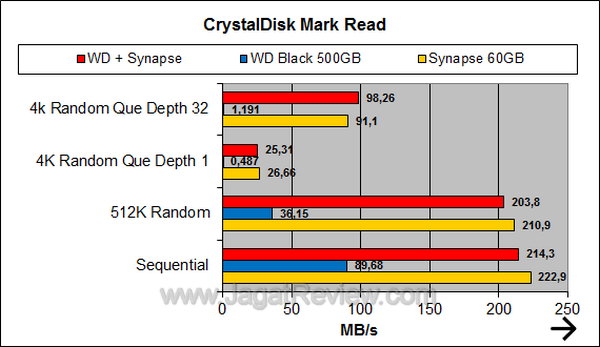
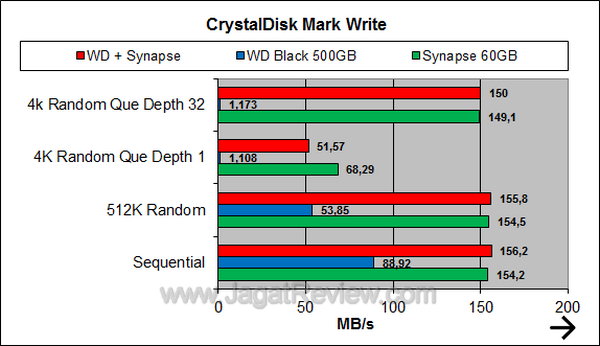
In this first test, the HDD+Synapse pair performs almost as good as a stand-alone Synapse. That is good news indeed. It means that you can truly elevate a hard drive’s performance to match that of an SSD.
PCMark 7
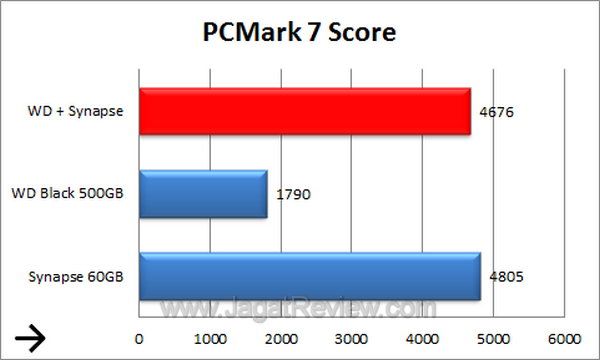
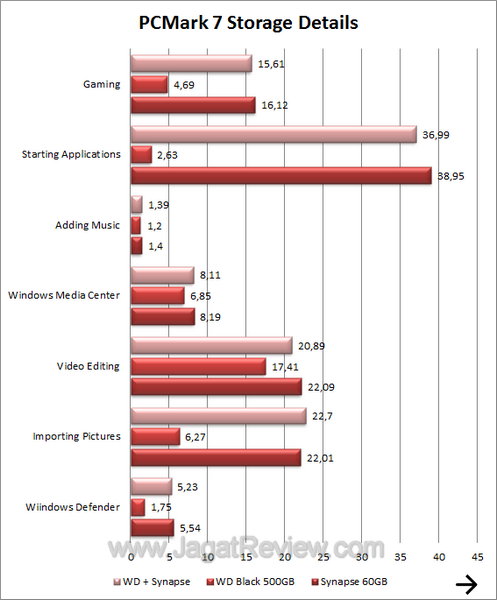
Again, in PC Mark 7, the hard drive experiences exponential performance increase when paired with the Synapse. As shown here, overall system performance is also improved.
File Transfer Test
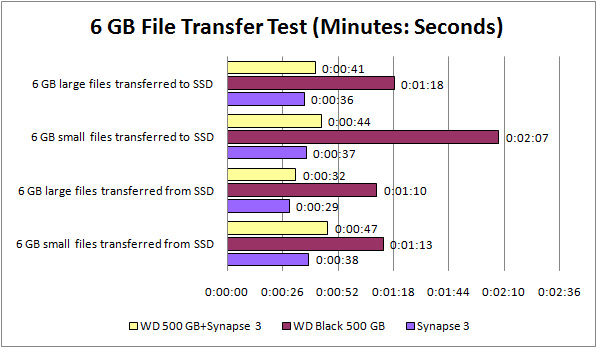
The 500 GB hard drive lags far behind when working on its own, but when coupled with the Synapse, its performance is increased significantly to more than twice as fast as before. It’s only a little bit slower than the stand-alone SSD.
Conclusions
Want to experience SSD performance while keeping your existing HDD as the main boot drive? The OCZ Synapse might just be the answer. This cache drive improves system performance by storing frequently accessed data, which effectively multiplies your hard drive cache to several gigabytes. Write performance is improved as well because the data is written to the Synapse first before finally being stored in the hard drive.
Because of the improved storage speed, your system’s performance will also be increased. During our data transfer test, the increase can measure up to three fold the original amount. This can be felt immediately during daily use.
The OCZ Synapse is suitable for professionals or home users who already have an existing HDD serving as boot drive (and do not want to re-install the applications or buy a dedicated SSD). With the Synapse, all that is required is to plug in the Synapse and install the Dataplex software. Afterwards, you’re ready to go. Needless to say, gamers will also benefit from this performance increase as the Synapse helps reduce application loading time.
Pros:
+ Improves your HDD performance significantly.
+ Supports TRIM, even when functioning as cache drive.
+ Dataplex software bonus.
Cons:
– 2 TB maximum hard drive capacity support.
– Only works in Windows 7 strong.
More Articles