A Few Simple Steps to Clean Your CD/DVD


Not too long ago, a friend complained about one CD in his music collection that was apparently unreadable on his CD player. It wasn’t the player’s fault because it plays other audio CDs flawlessly. Then, as I came along to his house, I immediately noticed the dirty surface of the disc. The solution was obvious, but people often do not know how to do it properly without damaging their disc in the process. You can follow these simple steps to clean your disc safely, but first, you have to prepare an eyeglass wipe or a piece of microfiber fabric. Those two are less likely to leave scratch marks on your precious disc compared to more common cloth materials like cotton. 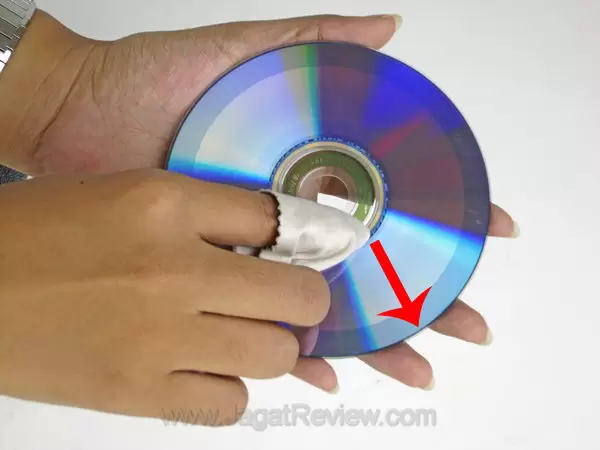
- It is important to remember that you should not wipe your disc using circular motions, because data tracks are lined up in that fashion and one circular scratch is enough to ruin a track or two. Instead, wipe your disc perpendicularly from the center to the edge, just like the illustration below. Move your finger in one direction only and repeat as necessary.
- It’s best to apply no pressure at all, but you can always apply some extra pressure to clean persistent dirt or stain. To minimize the risk of damage, move your finger in one direction only.
- If the stains turn out to be tougher than it looks, you can use the commercial CD-cleaning sprays that are widely available in computer stores. Alternatively, you can also use a few drops of alcohol.
- It’s a good idea not to use stronger cleaning agents -such as those intended to clean glass surfaces- on poor quality discs. I’ve once tried to do just that to a generic CD-R, only to have the cheap surface material corroded.
Finally, after making sure that the disc surface has been thoroughly cleaned, try to read the contents using your player/ computer. Whenever possible, always back up the contents to avoid future complications.
More Articles