Hands-On Review: AirLive N.Power – Modest in Appearance, Rich in Features

Reading time:
October 11, 2011

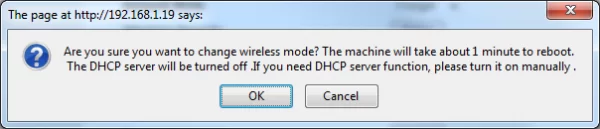
We have explored the features available in N.Power’s “Router” mode. Now, let’s move on to the “AP” mode. Unfortunately, switching mode requires a reboot, which can be inconvenient since it takes quite a while. According to a notification that pops up at mode switch, the reboot would only take up to 60 seconds. In reality, however, the process took around 75 seconds. That may not sound like much, but it could be pretty annoying since you have to wait for the reboot every time you change a setting, not just when switching modes.
AirLive N.Power 1311940592199
System Message 1312272028695 NEW R
This white screen will appear when the router is rebooting

In “AP” mode, the “Internet Settings” menu is no longer available. All of the main configurations for this mode are stored in the “Wireless Settings” menu. This menu displays the same list of options both in “Router” and “AP” modes.

AirLive N.Power 1311939551225 R
This is how the router management application looks like when the N.Power is in “AP” mode

When operating in “AP” mode, N.Power disables its internal DHCP Server. Instead, if the DHCP Sever on the main router is active, N.Power will forward the IP address distributed by the main router to every device connected to it.
The next operation mode, “Client”, turns the N.Power into a “wireless client” that can provide internet access from a Wireless Access Points to other devices connected to it.

AirLive N.Power 1311942126720 R
When in “Client” mode, most of the options in the “Wireless Settings” menu are not available
AirLive N.Power 1312272572934 NEW R
The "Site Survey" button brings you to a Wireless Access Point selection menu.

The next mode, “WDS Bridge”, gives exclusive access between Wireless Access Points. In this mode, N.Power’s wireless network can only be certain devices whose MAC addresses have been included in the WDS configuration.

AirLive N.Power 1311942520120 R
Like in “Client” mode, most of the “Wireless Settings” configuration options is not available in this mode
AirLive N.Power 1312271911541 NEW R
Input device MAC address here to give exclusive access to N.Power’s wireless network

All in all, based on our experience, Airlive does a nice job of arranging the menu layouts in all four operation modes available on the N.Power. User friendliness seems to be part of their main considerations in this matter.

Conclusions

If we were to describe the N.Power in one short sentence, we would say that it’s a useful networking tool equipped with user friendly configuration options. Its features, from four different operation modes, USB 2.0 ports, to PoE support give the N.Power an edge over the competition. It’s a pity that AirLive does not include PoE adapter in the standard sales package.

IMG 2520 R
AirLive N.Power during testing.

AirLive’s management application deserves some praise as well. With this application, users can make various configuration changes to the N.Power. The router remains easy to use despite its fairly comprehensive configuration options. Only, the 75 seconds re-boot process that occurs when a setting is changed can become rather annoying at times, especially when the user needs to change multiple settings.

Pros:

  • PoE Support.
  • Port USB 2.0.
  • Comprehensive and easy-to-use management application.

Cons:

  • Slow re-boot.
  • PoE adapter not included in sales package.
Share
Load Comments

Gadget

October 19, 2025 - 0

Review Infinix GT 30: Smartphone Gaming Padahal Aslinya All-Rounder!

Ini adalah Infinix GT 30! Ya, hape ini adalah versi…
July 10, 2025 - 0

Fossil Hadirkan Dua Jam Tangan Kolaborasi Marvel Fantastic Four

Fossil mengumumkan hadrinya dua jam tangan eksklusif hasil kolaborasi Marvel…
June 18, 2025 - 0

Review “Singkat” Samsung Galaxy S25 Edge: Smartphone Pemicu Pro-Kontra! Sebaik/Seburuk Itu?

Ini hape yang memicu Pro-kontra.  Banyak orang, bahkan kami pun…
June 17, 2025 - 0

Review Amazfit Active 2 Square: Smartwatch “Kotak” yang Klasik, Canggih, dan Baterai Awet!

Kalian sedang cari smartwatch bentuk kotak yang canggih, baterai irit,…

Laptop

May 8, 2026 - 0

Review ASUS ExpertBook Ultra (2026): Ultra Tipis, Ultra Kencang, Ultra Irit

Bodi ASUS ExpertBook Ultra (2026) Form Factor Clamshell Material Bodi…
April 29, 2026 - 0

Review Axioo Pongo 755 AMD: Sama Kencangnya, Sama Komplitnya, Lebih Murah Harganya

Bodi Form Factor Clamshell atau Laptop Klasik Material Metal untuk…
April 27, 2026 - 0

Review Acer Predator Helios 16 AI: Laptop Gaming 16″ Paling “Monster” dari Acer!

Bodi Acer Predator Helios 16 AI Nah untuk desain, ini…
April 26, 2026 - 0

Review ASUS ROG Strix G16 (G615): Laptop ROG Kelas Atas dengan RTX 5080, Sekencang Apa?

Bodi ASUS ROG Strix G16 (G615) Form Factor Clamshell atau…

Gaming

May 13, 2026 - 0

Sony Beri Dana Kepada Lebih Dari 120 Proyek Game Indie

Dukungan Sony terhadap pengembangan game indie kembali diperlihatkan, dengan dukung…
May 13, 2026 - 0

Kantor Pusat Nintendo Kembali Jadi Target Ancaman Bom

Nintendo kembali menerima ancaman bom di kantor pusat Kyoto, dan…
May 13, 2026 - 0

Katsuhiro Harada Dirikan Studio Game Baru Bersama SNK

Katsuhiro Harada yang dikenal sebagai bapak dari seri Tekken baru…
May 13, 2026 - 0

Rumor: Assassin’s Creed Hexe Diklaim Akan Bawa Kembali Ezio Auditore

Rumor seputar Assassin's Creed Hexe semakin menggila dengan munculnya klaim…